
Key Concepts:
- IHost: Initializes and configures services for the application.
- IHostedService: Represents background services with lifecycle management.
- Graceful Shutdown: Handling cleanup tasks when the application stops.

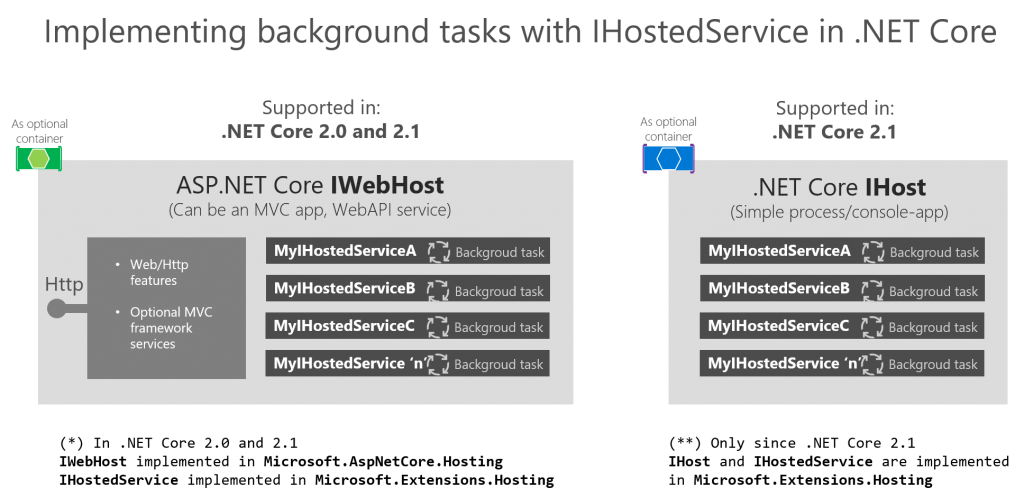
In .NET Core, the IHost interface is used to configure and run applications, particularly when implementing background services or hosting long-running processes. By using IHostedService, developers can easily manage these services with built-in support for dependency injection, logging, and graceful shutdown.
Use the new HttpClientFactory to create HttpClient objects in ASP.NET Core. Learn how to create Named or Typed HttpClient instances.
With .NET Core 2.1 the HttpClientFactory is introduced. The HttpClientFactory is a factory class which helps with managing HttpClient instances. Managing your own HttpClient correctly was not so easy. The HttpClientFactory gives you a number of options for easy management of your HttpClient instances. In this post I’ll explain how to use the HttpClientFactory in your ASP.NET Core application.
Continue reading “HttpClient and HttpClientFactory in ASP.NET Core”
WCF meets .NET Core
Only a few years back Windows Communication Foundation (WCF) was the way to do communication on the Microsoft platform based on SOAP protocol. Now a days new services are mostly build on top of Representational State Transfer (REST) Services. Sometimes you have to access a ‘legacy’ SOAP services for .NET Core. .NET Core has limited WCF support. In this blog post I’ll explain how to consume SOAP services form .NET Core.
Continue reading “Access XML SOAP services in .NET Core and client certificates (SSL)”
Run background processes with the IHostedService and how to inject your services with dependency injection
Many services need background processing. The ASP.NET Core 2.X IHostedService interface gives you an easy implementation skeleton to implement background processes. The Hosted Services are registered in the dependency injection at startup and started automatically. You do not have to do the pluming to get them started at startup. On shutdown you can implement a graceful shutdown. When running background processes there a few pitfalls to avoid. In this blog I’ll introduce the IHostedService and how to avoid common memory leaks when implementing the hosted service.
Continue reading “ASP.NET Core background processing with IHostedService”
This post explaines how to add index to EF Core with extra columns included from code.
When creating indexes with code first migrations in Entity Framework Core you can create an index on a table by adding the following to your DbContext:
protected override void OnModelCreating(ModelBuilder modelBuilder)
{
base.OnModelCreating(modelBuilder);
modelBuilder.Entity<table>()
.HasIndex(t => new { t.Column1, t.Column2}); }
Continue reading “Add Index with Include Entity Framework Core”
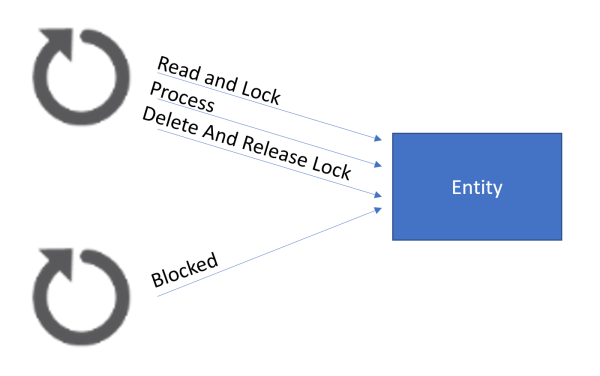 In a scenario where we were using SQL server as a queue, before publishing events to external queues, we wanted the data to be processed only once and in order, even with multiple processors for failover. When reading from the table we wanted to lock the records and block other processors from reading those records, while being processed. This is called Pessimistic Concurrency, unfortunately Entity Framework Core does not support this out of the box. To realize Pessimistic Concurrency you need to write your own SQL queries directly on the database (The solution is database type bound, in this case Microsoft SQL server). This blog post will show how it can be accomplished.
Continue reading “Implement Pessimistic Concurrency in Entity Framework Core”



 { Think Rethink }