
Key Concepts:
- IHost: Initializes and configures services for the application.
- IHostedService: Represents background services with lifecycle management.
- Graceful Shutdown: Handling cleanup tasks when the application stops.

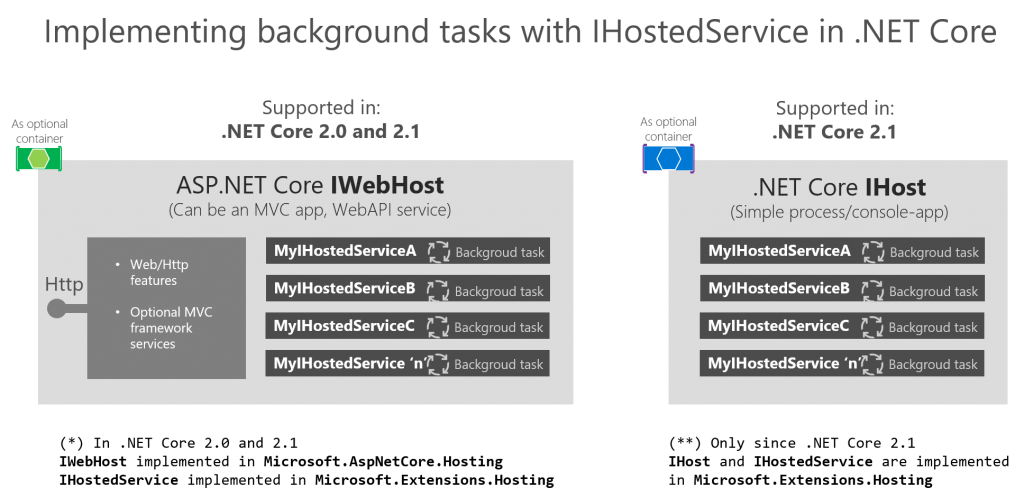
In .NET Core, the IHost interface is used to configure and run applications, particularly when implementing background services or hosting long-running processes. By using IHostedService, developers can easily manage these services with built-in support for dependency injection, logging, and graceful shutdown.
Use the new HttpClientFactory to create HttpClient objects in ASP.NET Core. Learn how to create Named or Typed HttpClient instances.
With .NET Core 2.1 the HttpClientFactory is introduced. The HttpClientFactory is a factory class which helps with managing HttpClient instances. Managing your own HttpClient correctly was not so easy. The HttpClientFactory gives you a number of options for easy management of your HttpClient instances. In this post I’ll explain how to use the HttpClientFactory in your ASP.NET Core application.
Continue reading “HttpClient and HttpClientFactory in ASP.NET Core”
In .NET 6 and 7, background services (IHostedService) are often used for tasks like long-running processes. These services run in the background and might need to access scoped services (e.g., DbContext). Directly injecting a scoped service into IHostedService causes issues because they have different lifetimes.
To solve this, we can use IServiceScopeFactory to create a scope for each background task. This allows us to resolve the scoped service properly within the background service, ensuring it’s disposed correctly.
Here’s an updated example of how to implement this in a modern .NET application:
Continue reading “Injecting a Scoped Service into IHostedService in .NET 6/7”In the previous blog post called background tasks with ASP.NET Core using the IHostedService Peter described how to use the IHostedInterface for background tasks. In this post, we continue on this subject and add some pointers on how to perform scheduled background tasks.
In many software projects, there are repetitive tasks; some do just repeat every x seconds after the last instance is finished but you might also have to run a task on a schedule like every 10 minutes. When building repeating or scheduled tasks there are many options on how to approach the scheduling and this approach can be influenced by a number of technical choices.
Building the scheduling yourself is an option when you do not want to add extra dependencies to your project, have full control or just want an extra technical challenge. An out of the box solution you can a look at Hangfire, Quartz.net, or an external service that does an http call every x seconds to trigger the task (something like Pingdom).
Continue reading “Run scheduled background tasks in ASP.NET Core”
Run background processes with the IHostedService and how to inject your services with dependency injection
Many services need background processing. The ASP.NET Core 2.X IHostedService interface gives you an easy implementation skeleton to implement background processes. The Hosted Services are registered in the dependency injection at startup and started automatically. You do not have to do the pluming to get them started at startup. On shutdown you can implement a graceful shutdown. When running background processes there a few pitfalls to avoid. In this blog I’ll introduce the IHostedService and how to avoid common memory leaks when implementing the hosted service.
Continue reading “ASP.NET Core background processing with IHostedService”
The “Cannot access a disposed object” exception in ASP.NET Core, especially when using Entity Framework’s DbContext, is a common issue developers face. This article explores the root causes, prevention strategies, and best practices to avoid this error in modern ASP.NET Core applications.
The ObjectDisposedException typically occurs when an attempt is made to use an object that has already been disposed. In the context of ASP.NET Core and Entity Framework, this often involves the DbContext. The error message generally looks like this:
Continue reading “Cannot access a disposed object in ASP.NET Core when injecting DbContext”System.ObjectDisposedException: Cannot access a disposed object.




 { Think Rethink }