Whipping Up Perfection: A Foolproof Guide to Meringues That Won’t Flop

Ah, meringues. The delicate clouds of sweetness that are equal parts dessert and wizardry. They’re crunchy, they’re airy, and if you follow this guide, they might not stick to the pan like an existential crisis.

So, grab your whisk and let’s get cracking. Eggs, that is.

Ingredients:

  • 4 Egg Whites
    (Pro tip: Save the yolks for ice cream or candy. Waste not, want more dessert!)
  • 240g White Sugar
    (That’s about twice the weight of your egg whites, or roughly a sugar-fueled toddler’s energy level.)
  • A Pinch of Salt
    (It’s like the seasoning salt of the meringue world—tiny but mighty.)

Continue reading “Whipping Up Perfection: A Foolproof Guide to Meringues That Won’t Flop”

Tiny Puffs of Happiness: Poffertjes Recipe

Hey there, fellow flapjack fanatic! Are you ready to embark on a journey to the land of tiny, fluffy pancake perfection? We’re talking about Poffertjes—the cutest, tastiest little morsels you’ll ever meet. They’re like pancakes’ younger, cooler cousin, and they’re here to steal your taste buds’ hearts.


Ingredients for a Fluffy Poffertje Party (Serves 4)

  • 450ml Milk – The glue that holds our dreams together.
  • 300g Flour – Regular ol’ flour, not the flower from your garden.
  • 2 Eggs – Fresh, free-range, or just the ones hiding in your fridge.
  • 1 tsp Baking Powder (or a sprinkle of yeast) – For that puff-power!
  • Pinch of Salt – A lil’ salty sass to balance the sweetness.
  • 1 Tbsp Sugar – Sweet enough to make your dentist nervous.
  • Butter & Powdered Sugar – For dressing these beauties up.

Tools of the Trade

  • Poffertjes Pan – It’s got tiny pancake craters; it’s adorable.
  • Squeezy Bottle – The secret weapon for precision batter-dolloping.

Continue reading “Tiny Puffs of Happiness: Poffertjes Recipe”

How to Capture and Analyze Memory Dumps from .NET Core Applications in Linux Containers on AKS

When working with .NET Core applications running in Linux containers on Azure Kubernetes Service (AKS), troubleshooting memory-related issues can be a challenging task. One of the most effective ways to investigate such issues is by capturing a memory dump, which provides a snapshot of your application’s memory at a given point in time. This guide walks you through the process of capturing and analyzing memory dumps for .NET Core applications running in AKS.

Prerequisites

Before we get started, ensure that:

  • You have a .NET Core application running in a Linux-based container on AKS.
  • You have access to the Azure Kubernetes Service and can execute kubectl commands.
  • You are familiar with basic Kubernetes and Docker commands.
Continue reading “How to Capture and Analyze Memory Dumps from .NET Core Applications in Linux Containers on AKS”

Enhancing Reliability in ASP.NET Core Containers with Kubernetes Probes

Learn how to implement and configure health checks, including liveness, readiness, and warm-up probes, in your ASP.NET Core application running on Kubernetes. These probes help ensure your application remains healthy by automatically checking its status, reducing downtime. This guide walks you through setting up health checks, configuring Kubernetes probes, and troubleshooting common issues, as well as best practices for maintaining container health and preventing failures.

In a Kubernetes environment, ensuring that your application stays healthy is crucial for uptime and performance. By using liveness, readiness, and warm-up probes, we can detect failures early and prevent downtime. These probes check different aspects of an application’s health:

  • Liveness Probe: Verifies if the application is still running.
  • Readiness Probe: Checks if the application is ready to serve traffic.
  • Warm-up Probe: Ensures the app is fully initialized before accepting requests.

Why Are Probes Essential?

Probes help Kubernetes automatically manage container health, reducing the need for manual intervention when an application faces issues like startup delays, service unavailability, or memory leaks. Proper configuration of these probes ensures that your app is only available when ready and doesn’t waste resources on containers that are unresponsive.

Step-by-Step Guide to Configuring Probes in ASP.NET Core

1. Implementing Health Checks in ASP.NET Core

ASP.NET Core provides built-in middleware to manage health checks. To begin, you’ll need to add the Microsoft.AspNetCore.Diagnostics.HealthChecks package to your project:

dotnet add package Microsoft.AspNetCore.Diagnostics.HealthChecks

In your Startup.cs, configure health checks for liveness and readiness:

public void ConfigureServices(IServiceCollection services)
{
    services.AddHealthChecks()
        .AddSqlServer(Configuration.GetConnectionString("DefaultConnection"));
}
2. Configuring Probes in Kubernetes

Add the probes in your Kubernetes YAML configuration:

livenessProbe:
  httpGet:
    path: /health/liveness
    port: 80
  initialDelaySeconds: 10
  periodSeconds: 5

readinessProbe:
  httpGet:
    path: /health/readiness
    port: 80
  initialDelaySeconds: 5
  periodSeconds: 5
3. Warm-up Logic: Avoid Unnecessary Failures

If your application requires time to initialize or load data, consider implementing a warm-up strategy. A warm-up probe ensures that Kubernetes waits until your app is fully ready before sending traffic to it.

Troubleshooting Common Issues

  • Slow Response: If probes fail because the container responds slowly, consider increasing the timeoutSeconds or failureThreshold to give your app more time to stabilize.
  • Misconfigured Probes: Ensure your paths match the ones defined in your app. Missing or incorrect endpoints can cause probe failures.

Best Practices

  • Use startupProbe for apps with slow startup times.
  • Ensure probes don’t become too aggressive, causing unnecessary restarts.
  • Review probe logs regularly to identify misconfigurations or performance bottlenecks.

Links
https://kubernetes.io/docs/tasks/configure-pod-container/configure-liveness-readiness-probes/
https://docs.microsoft.com/en-us/aspnet/core/host-and-deploy/health-checks?view=aspnetcore-2.2
https://www.hanselman.com/blog/HowToSetUpASPNETCore22HealthChecksWithBeatPulsesAspNetCoreDiagnosticsHealthChecks.aspx


Hosting services in .NET Core console application

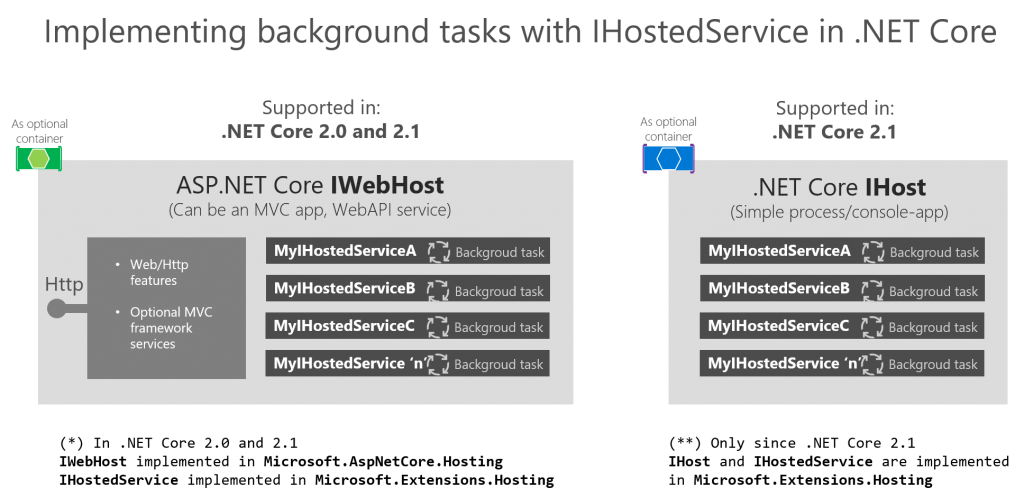
In .NET Core, the IHost interface is used to configure and run applications, particularly when implementing background services or hosting long-running processes. By using IHostedService, developers can easily manage these services with built-in support for dependency injection, logging, and graceful shutdown.

Key Concepts:

  • IHost: Initializes and configures services for the application.
  • IHostedService: Represents background services with lifecycle management.
  • Graceful Shutdown: Handling cleanup tasks when the application stops.
Continue reading “Hosting services in .NET Core console application”

HttpClient and HttpClientFactory in ASP.NET Core

Use the new HttpClientFactory to create HttpClient objects in ASP.NET Core. Learn how to create Named or Typed HttpClient instances.

With .NET Core 2.1 the HttpClientFactory is introduced. The HttpClientFactory is a factory class which helps with managing HttpClient instances. Managing your own HttpClient correctly was not so easy. The HttpClientFactory gives you a number of options for easy management of your HttpClient instances. In this post I’ll explain how to use the HttpClientFactory in your ASP.NET Core application.

Continue reading “HttpClient and HttpClientFactory in ASP.NET Core”

Injecting a Scoped Service into IHostedService in .NET 6/7

In .NET 6 and 7, background services (IHostedService) are often used for tasks like long-running processes. These services run in the background and might need to access scoped services (e.g., DbContext). Directly injecting a scoped service into IHostedService causes issues because they have different lifetimes.

To solve this, we can use IServiceScopeFactory to create a scope for each background task. This allows us to resolve the scoped service properly within the background service, ensuring it’s disposed correctly.

Here’s an updated example of how to implement this in a modern .NET application:

Continue reading “Injecting a Scoped Service into IHostedService in .NET 6/7”

Access XML SOAP services in .NET Core and client certificates (SSL)

WCF meets .NET Core

Only a few years back Windows Communication Foundation (WCF) was the way to do communication on the Microsoft platform based on SOAP protocol. Now a days new services are mostly build on top of Representational State Transfer (REST) Services. Sometimes you have to access a ‘legacy’ SOAP services for .NET Core. .NET Core has limited WCF support. In this blog post I’ll explain how to consume SOAP services form .NET Core.
Continue reading “Access XML SOAP services in .NET Core and client certificates (SSL)”

Run scheduled background tasks in ASP.NET Core

In the previous blog post called background tasks with ASP.NET Core using the IHostedService Peter described how to use the IHostedInterface for background tasks. In this post, we continue on this subject and add some pointers on how to perform scheduled background tasks.

In many software projects, there are repetitive tasks; some do just repeat every x seconds after the last instance is finished but you might also have to run a task on a schedule like every 10 minutes. When building repeating or scheduled tasks there are many options on how to approach the scheduling and this approach can be influenced by a number of technical choices.

Building the scheduling yourself is an option when you do not want to add extra dependencies to your project, have full control or just want an extra technical challenge. An out of the box solution you can a look at Hangfire, Quartz.net, or an external service that does an http call every x seconds to trigger the task (something like Pingdom).

Continue reading “Run scheduled background tasks in ASP.NET Core”

ASP.NET Core background processing with IHostedService

Run background processes with the IHostedService and how to inject your services with dependency injection

Many services need background processing. The ASP.NET Core 2.X IHostedService interface gives you an easy implementation skeleton to implement background processes. The Hosted Services are registered in the dependency injection at startup and started automatically. You do not have to do the pluming to get them started at startup. On shutdown you can implement a graceful shutdown. When running background processes there a few pitfalls to avoid. In this blog I’ll introduce the IHostedService and how to avoid common memory leaks when implementing the hosted service.
Continue reading “ASP.NET Core background processing with IHostedService”